
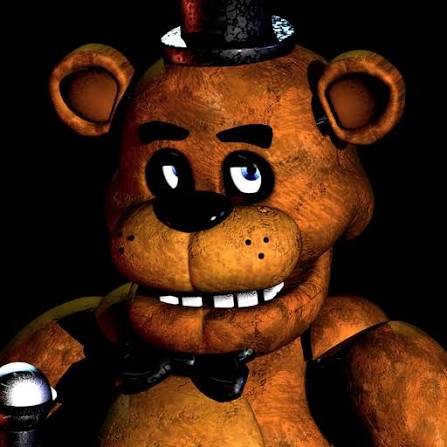
Why Five Nights at Freddy's still works as browser horror
Five Nights at Freddy's turned a simple job — watch the monitors, conserve power, survive the shift — into one of the most recognizable horror formulas on the internet. The fear comes from waiting, listening, and realizing you checked the wrong camera one second too late.
The browser version on this page lets you jump into that loop quickly. You are a night guard at Freddy Fazbear's Pizza, a family restaurant that feels wrong the moment the lights go down. The animatronics move when you are not looking, the power meter drops every time you act, and every night asks you to read patterns instead of reacting blindly.
If you want a horror game built on tension rather than long exploration, FNAF 1 is a strong pick. It is short to learn, hard to master, and easy to replay when you want to test a better camera rhythm or power plan.
What Five Nights at Freddy's is about
Five Nights at Freddy's is a survival horror game created by Scott Cawthon. You play as a security guard working from a small office between midnight and 6 AM. Your tools are limited: security cameras, door controls, and hallway lights. Your enemy is not a single monster chasing you down a hallway — it is a building full of animatronic characters that gradually become more aggressive across the week.
Each night increases pressure. Animatronics appear in new places, move faster, and punish bad habits like leaving doors closed too long or wasting power on unnecessary checks. The game succeeds because it makes routine feel dangerous. Checking cameras feels safe until it suddenly is not.
The embedded player above loads the game through 1games.io so you can try the experience directly in the browser. Performance may vary by device and browser, so headphones and a stable connection are recommended for the best first session.
Best reasons to play Five Nights at Freddy's
- Iconic horror design: Camera checks, limited power, and jump scares created a formula many later horror games copied.
- Easy to start, tough to finish: The controls are simple, but surviving Night 5 and Night 6 requires real pattern learning.
- Strong audio cues: Footsteps, movement sounds, and phone messages help you understand what is happening beyond the monitor screen.
- Short session structure: Each night is a self-contained challenge, which makes browser play feel natural.
- Replay value: Better players win by improving timing, camera order, and power discipline rather than memorizing one perfect script.
Animatronics and what to watch each night
Knowing the cast helps you understand why a night suddenly feels harder. Each animatronic pressures the office in a different way.
- Freddy Fazbear: Often the late-game threat. He becomes more dangerous once the other animatronics are handled poorly, so power management matters most on later nights.
- Bonnie: Usually attacks from the left side. Players who ignore the left camera chain often lose power or get caught while fixing the wrong door.
- Chica: Usually pressures the right side. Like Bonnie, she teaches you to check side cameras before committing to doors or lights.
- Foxy: Punishes players who stop checking cameras. If Pirate Cove stays quiet too long, he can rush the office and force a fast reaction.
- Golden Freddy: A special encounter that appears under specific conditions. New players should focus on the main four first, then learn this exception later.
On early nights, treat the game like a monitoring routine: check critical cameras, confirm side positions, then return to the office view before using doors or lights.
Core gameplay systems
- Camera monitoring: Use the tablet to track animatronic movement through the restaurant. The goal is information, not constant watching.
- Power management: Doors, lights, and the monitor all consume electricity. Running out of power leaves you defenseless.
- Door control: Closing a door can save you, but keeping both doors shut drains power quickly. Use doors only when you confirm a threat.
- Hall lights: Side lights help verify whether Bonnie or Chica is at the door before you commit power to closing it.
- Night progression: Nights 1 through 5 form the main campaign, with extra nights available for players who want harder survival tests.
Tips for your first few nights
These are practical starting notes for browser players, based on common first-run mistakes rather than hidden developer data.
- Night 1 is for learning: Use it to understand camera layout, office controls, and how quickly power drains.
- Check Pirate Cove regularly: Foxy is the classic punishment for players who stare at the wrong feeds too long.
- Do not panic-close both doors: Power loss is one of the most common reasons new players fail before 6 AM.
- Listen while you watch: Audio often tells you where movement is happening before the camera confirms it.
- Replay with one improvement: After losing, change only one habit — camera order, light timing, or door discipline — and try again.
Suggested play order
- Start with Night 1 and focus on learning the office controls, not speed.
- Move to Night 2 once you can track Bonnie, Chica, and Foxy without overusing power.
- Treat Nights 3 to 5 as pattern tests rather than reaction tests.
- Return to earlier nights if you want to practice a cleaner camera rhythm before pushing forward.
Editorial note and useful links
This page is part of an independent game guide site. We do not develop Five Nights at Freddy's, and we are not affiliated with Scott Cawthon, Steel Wool Studios, or the embedded host platform. The browser player is included so visitors can try the game after reading the guide.